Accessing Toolbox Data
We have attempted to create a number of data capture options to suit varied purposes, extents of use and resources available. Our philosophy with the Early Years Toolbox is to enable these tools getting into the hands of those who have the greatest opportunity to inform and/or affect children’s trajectories. To achieve this, it means the tools have to be broadly usable, accessible, actionable and low-cost – in addition to usual requirements of rigorous validity and reliability standards. In relation to data capture, there are two low-cost options available:
- Scores on the final screen
- Built-in CSV Export functionality
1. Scores on Final Screen


On completion of an EYT app, a summary of the results will be presented on the final screen – either with or without Child Performance Charts (depending on the app settings you selected). Both show summary scores based on the child’s trial-by-trial performance, but are not recommended for research applications. Instead, it is recommended that you use trial-by-trial accuracy and response time data, which can be extracted using CSV Export, then examined and collated in the desired manner. These final screen scores should nevertheless provide a good estimate of the child’s ability, assuming the integrity of the task’s administration and child’s engagement (see earlier training material).
The child performance charts, if selected, can be interpreted as follows: A score within the middle three bands (yellow, green, light blue) can roughly be considered within age expectations (characterising the middle 60% of children that age). A score in the dark blue can be considered above age expectations (the top 20% of children that age). Scores in the orange can be considered as somewhat below age expectations (the bottom 20% of children that age). Note: Performance bands are based on preliminary norms derived from Australian children attending pre-school services and thus are only for indicative purposes.
Play Again: This will return you to the app’s home screen. All fields will be cleared, but the app’s settings will be retained in the settings menu.
Data and Results: Trial-by-trial accuracy and response time data have been captured by the iPad; these are saved locally on the device. These data points can be extracted using the CSV Export option which fetches the data files stored on the device. Note: This data file is generated at the final screen, so only completed tasks will generate a data file. If the task is not completed, it is not recommended that you use partial data (given it is unclear how far the child would have progressed if they had attempted to complete the task). As data files are saved locally on the iPad, deleting the EYT app will permanently delete the data from the device.
| Benefits + | Limitations - |
|---|---|
| Immediate | Based on unprocessed data, so is not recommended for research purposes |
| No setup required - provided by default |
|
| No associated costs |
Suggested Users: Educational uses where immediate information is privileged.
2. CSV Export
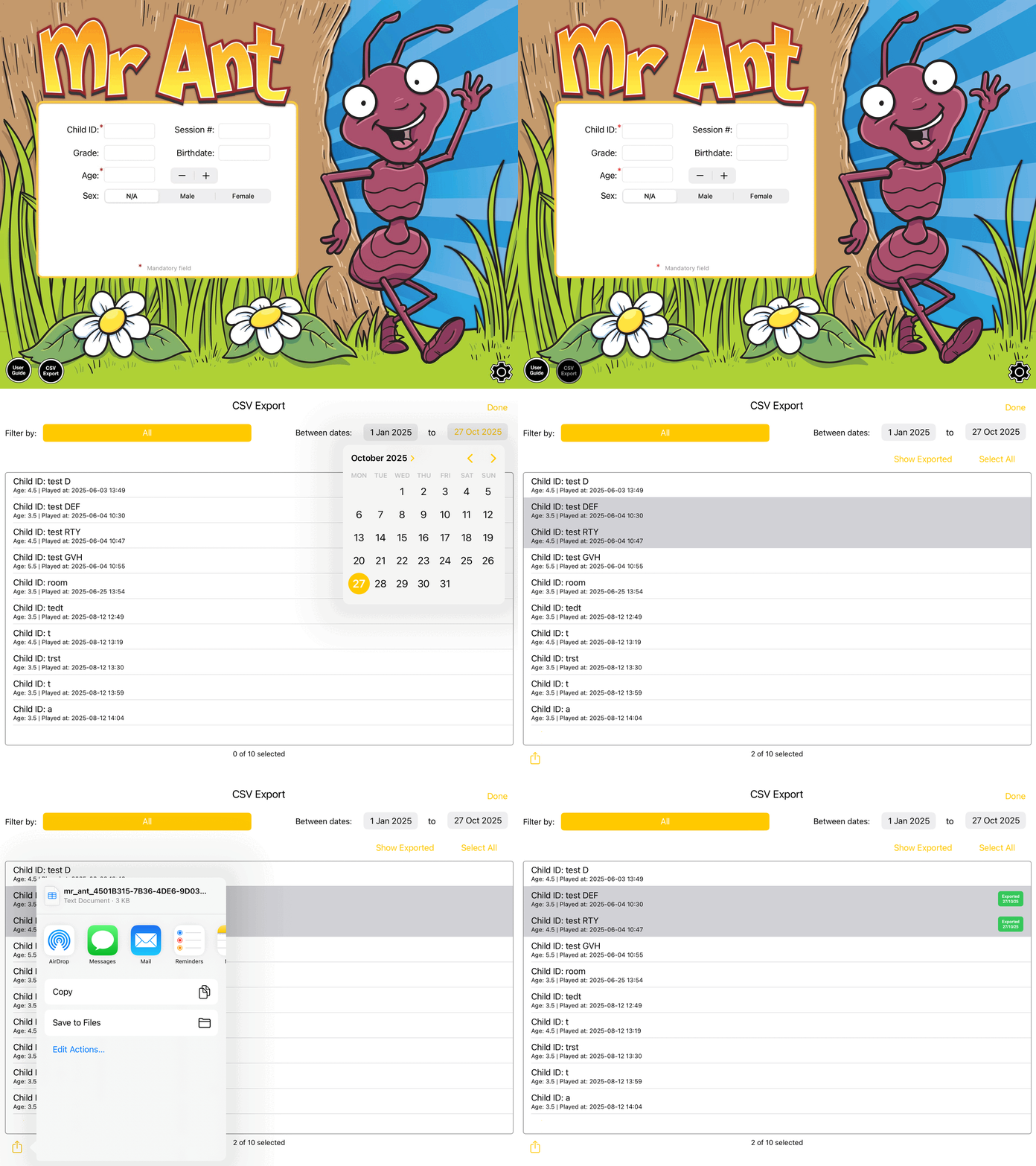
Once you complete an assessment, you will be able to locate it within the new CSV Export functionality located at the bottom left of the app's home screen. At your desired intervals, you can batch export a csv file that includes trial-by-trial accuracy and response time data for game data you have selected (as shown above). Simply, tap the share button on the bottom left, where you will be able to choose your preferred method of sharing in the Apple Share Sheet (e.g. through message, e-mail, save to File, or shared with other apps or devices like through AirDrop). No setup is required to use this feature, but may require compiling (by copy and paste) of multiple CSV files.
| Benefits + | Limitations - |
|---|---|
| No setup required - provided by default | Requires post-collection processing:
|
| No associated costs |
Suggested Users: Small-to-medium planned uses, in terms of number of children, EYT apps that will be used and/or single point in time.
EYT Scores Templates
While it is possible to simply use the summary statistics we provide on the end screen after each administration, note that these scores are derived from unprocessed data, and thus should be considered in this light. For larger-scale and more formalised uses, we recommend using full trial-by-trial data for analysis.

For the Mr Ant task, scores are calculated using a point score calculated as: beginning from level 1, one point for each consecutive level in which at least two of the three trials were performed accurately, plus 1/3 of a point for all correct trials thereafter. For a sample spreadsheet to facilitate this data cleaning process, please click here.

(MS Excel, 56KB)

For the Not This task, scores are calculated using a point score calculated as: beginning from level 1, one point for each consecutive level in which at least three of the five trials were performed accurately, plus 1/5 of a point for all correct trials thereafter. For a sample spreadsheet to facilitate this data cleaning process, please click here.

(MS Excel, 88KB)

For the Go/No-Go task, we start by removing all trials for which responding was faster than 300 ms (and thus is unlikely to have been in response to the stimulus). We then remove all blocks in which the child was largely non-responsive (go accuracy below 20% and no-go accuracy exceeds 80%) or indiscriminately responsive (go accuracy exceeds 80% and no-go accuracy below 20%). From the resultant data, we then calculate an impulse control score (% Go Accuracy x % No-Go Accuracy), which reflects the child’s ability to withhold their response in the context of the strength of that typical (pre-potent) response. For a sample spreadsheet to facilitate this data cleaning and calculation process, please click here.

(MS Excel, 343KB)

For the Card Sorting task, we tend to review the accuracy of Block 1 (pre-switch) and Block 2 (post-switch). Since a post-switch accuracy score intends to index the extent to which a child could successfully switch from one sorting rule to the next, we swap the two scores if the post-switch accuracy is larger than the pre-switch accuracy. This ensures that final post-switch scores (Block 2 + Block 3) reflects the child’s ability to successfully switch between sorting rules. For a sample spreadsheet to facilitate this, please click here.

(MS Excel, 24.9KB)

For the Child Self-Regulation and Behaviour Questionnaire, a number of items must be reverse-scored prior to combination into sub-scales. The following sub-scales can be derived as follows:
- Sociability: Items 1, 4, 9, 16(reversed), 22(reversed), 27, 32
- Externalising: Items 3, 20, 23, 26, 28
- Internalising: Items 17, 21, 25, 33, 34
- Prosocial: Items 15, 19, 24, 27, 30
- Behavioural Self-Regulation: Items 7(reversed), 13, 15, 29(reversed), 30, 31(reversed)
- Cognitive Self-Regulation: Items 5, 6, 8, 12, 18
- Emotional Self-Regulation: Items 2, 10, 11(reversed), 14(reversed), 23(reversed), 26(reversed)
For a sample spreadsheet to facilitate this data cleaning process, please here

(MS Excel, 177KB)

For the Early Numeracy task, scores are calculated as the number of correct items. Skip rules start children at different points in the game based on their age, with credit given for those earlier items (unless the child fails on early items, in which case they are returned to skipped items). Stop rules end the game after 5 consecutive incorrect responses, with subsequent unattempted trials considered incorrect. For a sample spreadsheet to facilitate this data cleaning process, please click here.

(MS Excel, 56KB)

For the PRSIST task, the following sub-scales are derived from observer ratings as follows:
- Cognitive Self-Regulation: Items 1, 2, 3, 4, 8 (or 9, depending on actvity)
- Behavioural Self-Regulation: Items 5, 6, 7
Ratings are completed for each activity separately (i.e., memory game, curiosity boxes) and combined into subscales as above. These activity scores are then averaged to generate overall PRSIST cognitive and behavioural self-regulation scores. For a sample spreadsheet to facilitate this data cleaning process, please click here.

(MS Excel, 120KB)

For the Vocab task, scores are calculated as the number of correct items. Stop rules end the game after 6 consecutive incorrect responses, with subsequent unattempted trials considered incorrect. For a sample spreadsheet to facilitate this data cleaning process, please click here.

(MS Excel, 16KB)
Fail Safes
As researchers ourselves, we understand the importance of ensuring no data is lost. For this reason, the iPad keeps local logs of the data files (generated at final screen). These data files can be manually extracted within the app, as detailed above. As long as the app is not deleted, these logs remain accessible for backup through File Sharing. Please refer to the step-by-step guide to manual data extraction via File Sharing.